3.2 The TUFLOW Modelling Concept
The core software required to construct TUFLOW models and review simulation results includes the following components:
- Text editor. Used to create and edit TUFLOW simulation control files, which define simulation commands and reference associated GIS and tabular datasets.
- Spreadsheet software. Used to prepare and manage time series data and other non spatial inputs.
- GIS software. Used to create, modify and manage geographically referenced model inputs and to visualise simulation results.
- Mesh generator. Used to generate the computational flexible mesh topology.
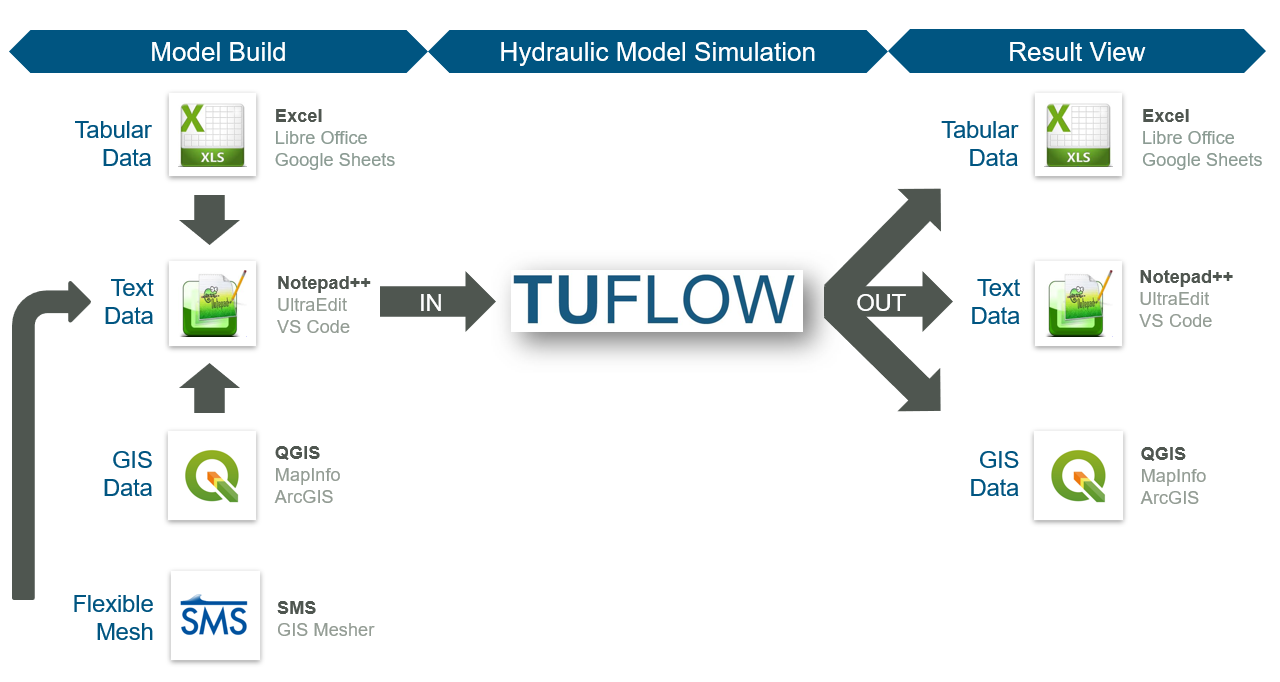
Figure 3.1: TUFLOW Modelling Concept
A commonly used supporting software combination includes Notepad++, Excel, QGIS (with the free QGIS TUFLOW Plugin) and SMS. Information on these packages is provided in Sections 3.2.1, 3.2.2 and 3.2.3. Use of these specific software packages is not mandatory. Alternative text editors, spreadsheet software, GIS platforms and mesh generation tools may be used as appropriate. A summary of commonly used supporting software options is provided in Table 3.1.
| Software Type | Suggested Software |
|---|---|
| Text Editor |
UltraEdit / TUFLOW FV Wiki UltraEdit Tips Notepad++ / TUFLOW FV Wiki Notepad++ Tips Visual Studio Code / TUFLOW FV Wiki Visual Studio Code Tips Other: Any text editor can be used for creating TUFLOW control files, including the Microsoft Windows default, Notepad. However, the above listed editors are recommended. They allow for advanced options, such as syntax highlighting of TUFLOW control files and launching TUFLOW simulations from the text editor. |
| Spreadsheet Software |
Microsoft Excel / TUFLOW FV Wiki Excel Tips Libre Office |
| GIS Platforms |
QGIS (TUFLOW Wiki QGIS Tips) with QGIS TUFLOW Plugin. The QGIS TUFLOW Plugin provides a range of pre- and post- processing tools and dynamic viewing of 1D and 2D results in TUFLOW Viewer. ArcGIS Pro (TUFLOW Wiki ArcGIS Tips) with Spatial Analyst for the creation of model inputs and viewing of static results. Dynamic viewing of 1D and 2D results is not available in ArcGIS. MapInfo Professional (TUFLOW Wiki MapInfo Tips) for the creation of model inputs and viewing of static results. Dynamic viewing of 1D and 2D results is not available in ArcGIS or MapInfo. QGIS (TUFLOW Wiki QGIS Tips), SMS (TUFLOW Wiki SMS Tips) or WaterRIDE are recommended to address these limitations. |
| Mesh Generators | SMS (TUFLOW FV Wiki SMS Tips) |
| Other Software |
Python (TUFLOW FV Python Toolbox) MATLAB (TUFLOW FV MATLAB Toolbox) |
3.2.1 Notepad++
Notepad++ is a free text editor available from https://notepad-plus-plus.org/downloads/. Its functionality makes it suitable for creating and maintaining TUFLOW FV control files. Key features relevant to TUFLOW FV model development include the following:
- Syntax Highlighting: Colour coding of TUFLOW control files to improve readability.
- Simulation Execution: Support for launching TUFLOW FV simulations directly from the editor.
- File Navigation: Support for opening files using relative paths defined within TUFLOW control files. For example, a water quality control file (
.fvwq) may be opened directly from a TUFLOW FV control file (.fvc) without manual file system navigation.
3.2.2 QGIS / TUFLOW Viewer
QGIS is a free, open-source geographic information system available from https://www.qgis.org/. It is an official project of the Open Source Geospatial Foundation (OSGeo). QGIS runs on Linux, Unix, macOS, Windows and Android, and supports a wide range of vector, raster and database formats and associated geospatial functionality.
An introductory eLearning module is available for users adopting QGIS as a model development or results visualisation environment. The Introduction to QGIS for TUFLOW eLearning covers configuration of QGIS for TUFLOW modelling and provides an entry level overview of relevant software functionality.
The free QGIS TUFLOW Plugin extends QGIS with tools designed to support TUFLOW modelling workflows. Installation and usage instructions are provided in the QGIS Tips and Tricks section of the TUFLOW Wiki.
The TUFLOW Viewer is included as part of the QGIS TUFLOW Plugin. It extends the QGIS map window to provide interactive visualisation of TUFLOW simulation results, including dynamic result interrogation and time varying displays. Documentation for the TUFLOW Viewer is available on the TUFLOW Wiki.
3.2.3 Aquaveo SMS Mesh Generator / TUFLOW FV Graphical User Interface
The Aquaveo Website, the SMS Wiki, the Aquaveo Learning Centre and the TUFLOW FV Wiki SMS Tips provide information regarding this product.
SMS variants are available for use with TUFLOW FV:
- SMS Community Edition: Sufficient for TUFLOW FV model construction. A free edition suitable for mesh generation and result visualisation. This edition is used for the TUFLOW FV Wiki Tutorial Models.
- SMS Riverine Pro Version: A licensed edition suitable for advanced TUFLOW FV mesh generation, result visualisation and analysis.