4.2 Control Files
TUFLOW FV control files are text files that define how a model is constructed and how a simulation is executed. Control files contain a sequence of commands that specify model configuration, input data and execution behaviour. They are designed to be easily scripted and interpreted, are typically concise and support efficient and repeatable modelling workflows.
The subsections that follow describe:
- Each control file type
- Control file rules and notation (Section 4.2.7)
- Use of absolute and relative file paths (Section 4.2.8)
Table 4.3 presents the available control file types.
| Control File | Description | Section |
|---|---|---|
| FVC | The TUFLOW FV Control File (.fvc) file sets simulation parameters and directs input from other data sources. This is main control file that TUFLOW FV reads when running a simulation. It is the top level (or parent) file. All input files are accessed via the .fvc file or files referred to from the .fvc file. | Section 4.2.1 |
| TEF | The TUFLOW Event File (.tef) includes a database of commands related to specific events. The .tef is read from the .fvc using the Event File command. | Section 4.2.2 |
| FVSED | The TUFLOW FV Sediment Transport Module Control File (.fvsed) includes the commands required for sediment transport simulation. The .fvsed file is read from the .fvc file using the Sediment Control File command. | Section 4.2.3 |
| FVWQ | The TUFLOW FV WaterQuality Module Control File (.fvwq) includes the commands required for water quality simulation. The .fvwq file is read from the .fvc file using the Water Quality Control File command. | Section 4.2.4 |
| FVPTM | The TUFLOW FV Particle Tracking Module Control File (.fvptm) includes the commands required for particle tracking simulation. The .fvptm is read from the .fvc file using the Particle Tracking Control File command. | Section 4.2.5 |
| Include File | A TUFLOW FV Include File is a file included inside another .fvc file. Any file extension be used, with .fvc traditionally used. Include files are useful for commands that are common to multiple simulations or for commands that are rarely or never changed. Include files can help to reduce clutter in the main .fvc file and their makeup are at the discretion of the user. | Section 4.2.6 |
4.2.1 FVC
The TUFLOW FV Control File (.fvc) defines simulation parameters and specifies references to all required input data sources. It represents the primary control file for a simulation, with all other input files accessed either directly from the .fvc file or through files referenced by it. Each TUFLOW FV simulation requires a corresponding .fvc file. An example extract from an .fvc file is provided in Figure 4.1. A valid .fvc file is required for execution of any TUFLOW FV simulation class.
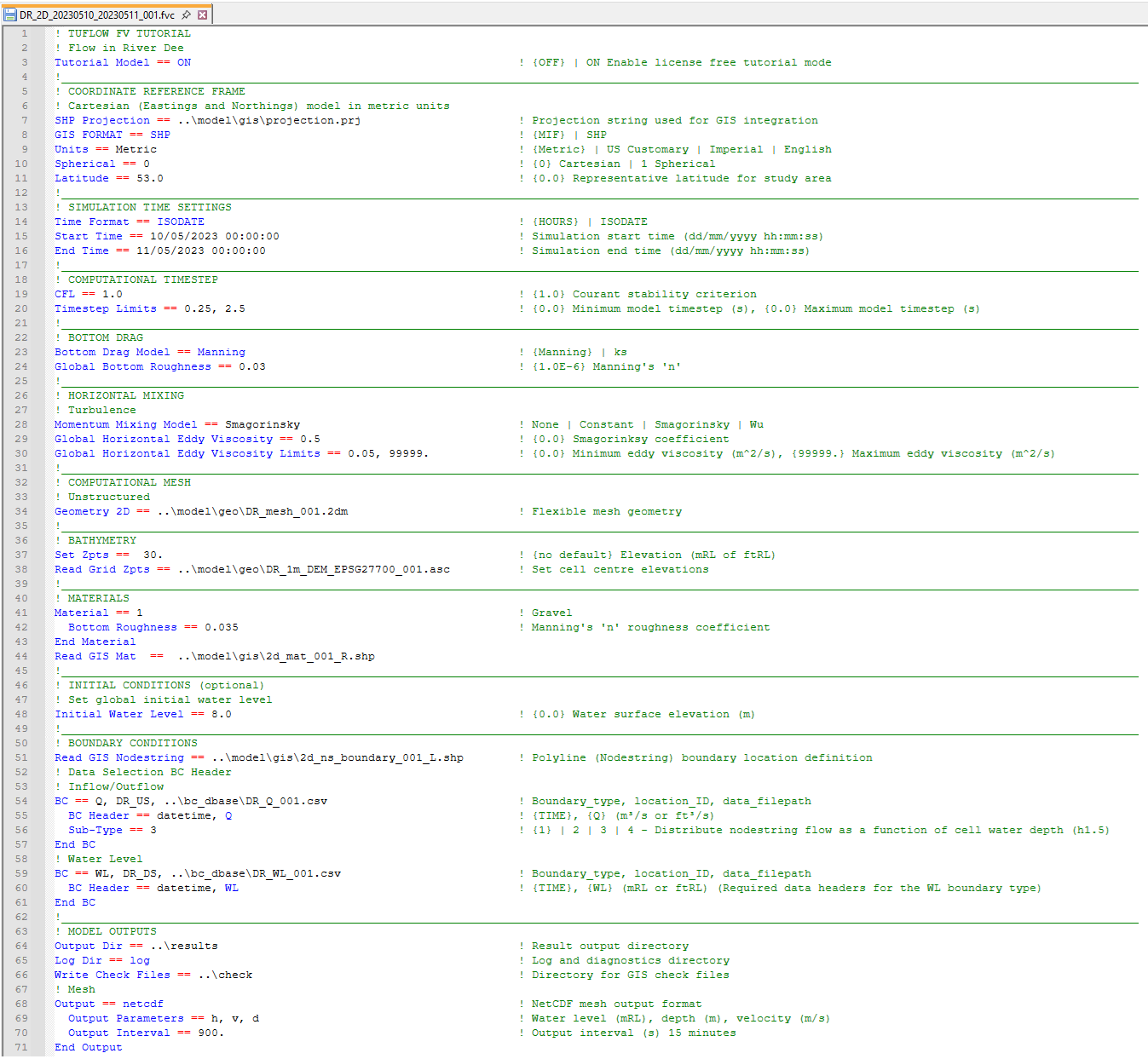
Figure 4.1: Example of a Simple FVC
Appendix A lists and describes all available .fvc commands.
4.2.2 TEF
The TUFLOW Events File (.tef) contains a database of .fvc control file commands used for event management. Event management enables multiple event combinations, such as magnitude, duration, temporal patterns and climate change scenarios, to be simulated using a single set of control files rather than separate control files for each simulation. This approach supports simplified model management, improved consistency between simulations and enhanced quality control. An illustration of the number of .fvc files required for models with and without event management is provided in Figure 4.2.
Instructions for configuring and using event management are provided in Chapter 11. An example implementation of event management is included in the TUFLOW FV Example Model Suite.
Use of a .tef file is optional and is supported for all TUFLOW FV simulation classes.
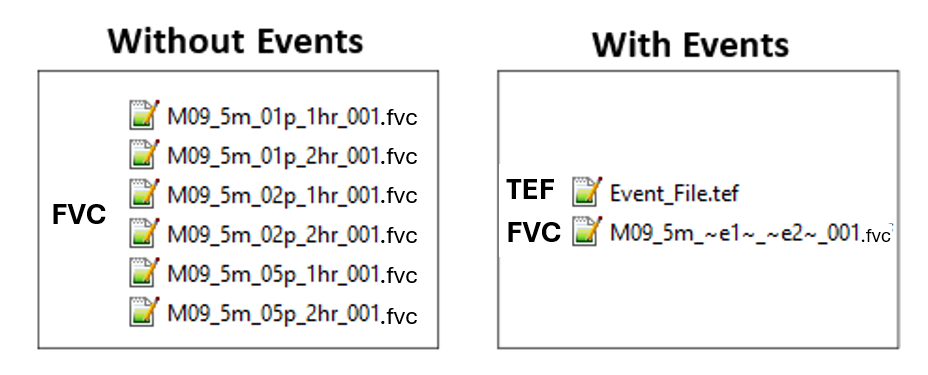
Figure 4.2: Reduction of Control Files using Event Management
4.2.3 FVSED
The TUFLOW FV SEDiment Control File (.fvsed) defines sediment properties and contains the commands required for sediment transport modelling.
An .fvsed file is required for simulations using the Sediment Transport (ST) simulation class.
4.2.4 FVWQ
The TUFLOW FV Water Quality Control File (.fvwq) defines water quality constituents and contains the commands required for water quality modelling.
An .fvwq file is required for simulations using the Water Quality (WQ) simulation class.
4.2.5 FVPTM
The TUFLOW FV Particle Tracking Module Control File (.fvptm) defines particle groups and contains the commands required for particle tracking modelling.
An .fvptm file is required for simulations using the Particle Tracking (PT) simulation class.
4.2.6 Include File
Include files may be used to group .fvc control file commands for inclusion within a parent .fvc file. This approach can reduce the size and complexity of primary control files and supports efficient application of global changes across multiple simulations.
As an example, line 59 in Figure 4.1 uses the GoC_Tide_20100301_20100501_AEST_001.fvc, as illustrated in Figure 4.3.
.fvc and .trd (TUFLOW Read File).
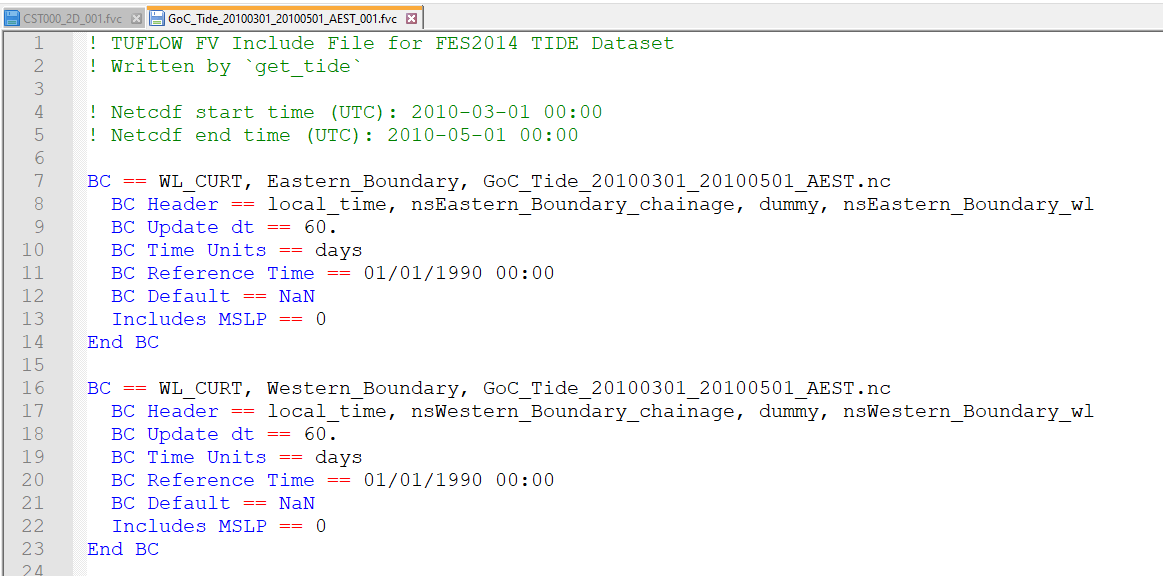
Figure 4.3: Example include file containing astronomical tide boundary conditions
4.2.7 Rules and Notation
Control files are command or keyword driven text or script files. Commands are entered in free form text, subject to the rules described in this section. Comments may be included on any line or following a command.
An example command is shown below:
This command sets the simulation start time to 10 hours. Text following the ! character is treated as a comment and is ignored by TUFLOW FV during interpretation.
Automatic colour coding of control files is available to support readability and interpretation. Download links and installation instructions are provided for the following text editors:
- https://fvwiki.tuflow.com/NotepadPlusPlus_Highlighting
- https://fvwiki.tuflow.com/UltraEdit_Colour_Coding, and
- https://fvwiki.tuflow.com/VS_Code_Tips.
Commands may be repeated as required. This provides flexibility during model construction, particularly for defining two dimensional bathymetry and topography. Where a command is repeated, later occurrences may override the effect of earlier occurrences of the same command.
The input style is flexible, subject to the following rules:
- Certain characters are reserved for special purposes, as described in Table 4.4.
- Commands appearing to the left of
== are not case sensitive. - On Windows operating systems, file paths and file names to the right of
== are not case sensitive. - On Linux operating systems, file paths and file names to the right of
== are case sensitive. - Only one command may be specified per line.
- Some commands require a related command to have been specified previously. These dependencies are documented where applicable.
Blank lines are ignored. Spaces or indentation may be used at the start of a line for clarity. Indentation is recommended when using control blocks, as described in Section 11.3. In the following example, indentation of the second line is not required but improves readability:
The notation used to document commands and valid parameter values in Appendix A is presented in Table 4.5.
| Special Character(s) | Description |
|---|---|
| “#” or “!” | A “#” or “!” causes the rest of the line from that point on to be ignored. Useful for “commenting-out” unwanted commands and for modelling documentation. |
| “==” |
A “==” following a command indicates the start of the parameter(s) for the command. Where there is more than one parameter, the parameter values are read as free-field formatted, i.e. are comma delimited. When processing command line syntax within a control file, if a “==” is not present in the command line syntax TUFLOW FV will produce an error message. The two exceptions to this rule are the Initial Condition OGCM and Initial Condition Quiescent commands. For example “ |
| “~ ~” | Enclosed “~ ~” syntax dynamically replaces the value of events or scenarios. This can occur within the file name of the .fvc file, or text within the .fvc file. |
| “<< >>” | Enclosed “<< >>” syntax is used to return the value of model variables that have been set using the Set Variable command or the value or events or scenarios. |
| “$” | A “$” returns the value of an environment variable that has been set in a batch or shell script. |
| spaces |
Spaces can occur in commands and parameter options (although commas are recommended for separating parameters). Spaces can occur in file and path names; however, third party software may not allow this and as such is not recommended. If using spaces in .fvc filenames, batch files will require that the filename is enclosed in quotes. |
| tabs |
Tabs can occur in command names and parameter options (although commas are recommended for separating parameters). Tabs should not be used in file names or file paths. |
| Documentation Notation | Description |
|---|---|
| < … > | Greater than and less than symbols are used to indicate a variable parameter. For example, the commonly used <file> example is described below. |
| <file> | A filename (can include an absolute or relative path, or a UNC path). See Section 4.2.8 for a more detailed description. |
| [ {Op1} | Op2 ] |
The “|” symbol separates the options. The “{” and “}” brackets indicate the default option. This option is applied if the command is not used. For example, the options for the Momentum Mixing Model command are: |
4.2.8 File Paths
TUFLOW FV control files reference a range of external input files, including CSV, GIS, NetCDF and other control files. File references may be specified using absolute file paths, relative file paths or UNC file paths. A model may use any combination of these methods, although relative file paths are typically preferred.
The following examples demonstrate each file path method using the Read GIS Mat command.
- Absolute file path:
Read GIS Mat == L:\Job\Job1234\TUFLOWFV\model\gis\2d_mat_001_R.shp - Relative file path:
Read GIS Mat == ..\model\gis\2d_mat_001_R.shp - UNC file path:
Read GIS Mat == \\server1\Job1234\TUFLOWFV\model\gis\2d_mat_001_R.shp
A relative file path is defined with respect to the location of the control file that references it. In this example, if the command is specified in a .fvc file located in the TUFLOWFV\runs\ directory, the ..\ notation moves up one directory level to TUFLOWFV\. The model\ entry then navigates into the TUFLOWFV\model\ directory, and gis\ further navigates into the TUFLOWFV\model\gis\. Multiple directory levels may be traversed by repeating the ..\ notation, such as ..\..\ to move up two levels.
If the referenced file is located in the same directory as the .fvc file, only the file name is required. In the following example, the file Model_Events.tef is assumed to reside in the same directory as the .fvc file.
File paths are always interpreted relative to the current control file. A command specified within an event file located in TUFLOWFV\model\ is resolved relative to the .tef file location rather than the .fvc file location.
Relative file paths support portability by allowing models to be relocated or transferred without modification of control files. Where absolute or UNC file paths are used, all references must be updated if the model location changes.
Absolute or UNC file paths may still be appropriate for large shared datasets that are accessed by multiple models. This avoids duplication of large datasets across projects.
On Linux systems, forward slashes are recommended in preference to backslashes.
Forward slashes are supported on both Windows and Linux operating systems. On Linux systems, directory and file names are case sensitive, whereas Windows systems are case insensitive.