4. Temporal Patterns
The temporal pattern options allow the user to add additional temporal patterns to the rainfall boundary outputs. Temporal patterns can be added by extracting patterns from other regions, or from using unused temporal patterns from within the same region.
Adding temporal pattern options will stack
Adding temporal patterns from both the same and different regions will stack.
For example, selecting an additional region + using all point temporal patterns will result in 60 point temporal patterns per event.
4.1 Additional Temporal Pattern - Adding Regions
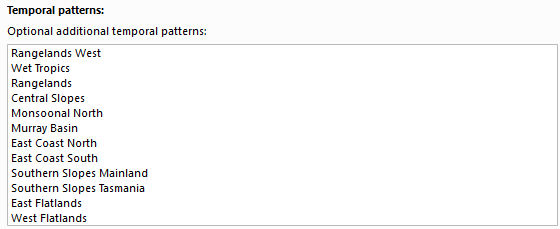
Additional temporal patterns can be added from different regions by selecting region(s) in the box. These are additional regions that will be added to the output i.e. it is not required to select the region the catchment location falls within, this will automatically be included.
4.2 Additional Temporal Patterns - Same Region
Additional temporal patterns can be added from the same region:
-
Use additional point temporal patterns available within region
Checking this option will add 20 extra point temporal patterns. The extra temporal patterns are taken from the unused rarity bands for any given event.
For example, if a 1% AEP event is selected, usually this would output 10 "rare" point temporal patterns. If this option is checked, the "frequent" and "intermediate" temporal patterns will also be included, resulting in 30 temporal patterns in total.
-
Use additional areal temporal patterns
If checked on, additional areal temporal patterns from the next closest area band will be added based on the number set in the input. If the input is set to
1, then an additional 10 temporal patterns will be added. A value of2will add 20 temporal patterns, and so on (up to 8).For example, if the catchment is 100 km2, the base areal temporal patterns would use the Area 100 areal temporal pattern band. If this option is checked on and the input value is set to
1, then the output will also include the Area 200 areal temporal pattern band. If the value is set to2then both the Area 200 and Area 500 temporal pattern bands will be added (resulting in 30 temporal patterns in total).

4.3 Outputs
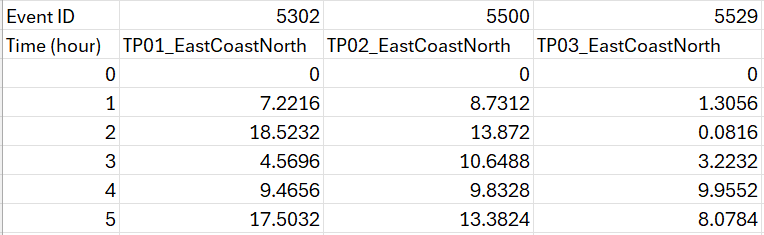
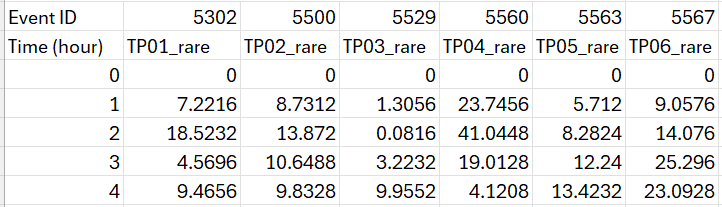
Additional temporal patterns will be added to the appropriate event CSV output in the rf_inflow folder.
The relevant information will be added as a suffix to the column names in the rf_inflow/*.csv outputs. This includes
to the base temporal pattern set.