3. Areal Reduction Factor (ARF)
The tool will automatically apply ARF values to the rainfall depths in the outputs. For example, the inflow data in
the rf_inflow/*.csv outputs are already ARF adjusted.
The applied ARF is based on the catchment area and other settings described below.
3.1 Catchment Area
This option sets the catchment area which is used to determine the ARF value, unless a User override - manually specify ARF has been set (see 3.2 ARF Settings). It is also used to determine whether to use point or areal temporal patterns, and which areal temporal pattern band to use if triggered.
The catchment area can set using either:
-
Calculate area (default): Let the tool calculate the area using the polygon geometry.
-
User area: Manually set the catchment area (km2).
This method can be useful when looping through subcatchments. The user can set the total catchment area rather than letting each subcatchment compute an independent ARF for each subcatchment.
The ARR guidelines recommend that the ARF should be computed for the upstream area at each point of interest, but not independently for each subarea (Book 2, Chapter 4, Section 3.1).
3.2 ARF Settings
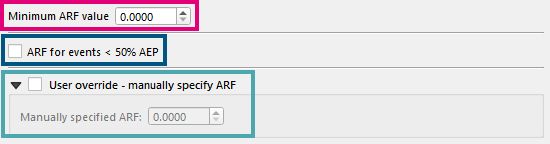
There are several other ARF settings which are described below:
-
Minimum ARF value Sets a floor to the calculated ARF. This must be a value between 0 and 1.
-
ARF for events < 50% AEP Events less than the 50% AEP are outside the guidance for the given ARF equations in the ARR guidelines. If this option is checked on, the tool will ignore the limit and calculate the ARF for frequent events. If unchecked, an ARF value of one (
1.0) will be used.Checking this option can be useful to retain continuity in rainfall depths. For example, the 63.2% AEP event might end up with more rainfall (or similar rainfall) than the 50% AEP due to the ARF values (or lack of ARF for the 63.2% AEP event).
-
User override - manually specify ARF Set the ARF that will be used. This will cause the catchment area parameter to be ignored for the ARF.
Only a single value can be used for all events.
Catchment area is still used for temporal patterns
The catchment area is still an important attribute for determining whether to use areal or point temporal patterns.
3.3 Working Data
Calculated ARF values are output into the working_data folder. The working_data ARF values in will always report the calculated ARF values using the catchment area and the ARF parameters obtained from the data hub, even if the user specifies an override ARF.