2. Climate Change
2.1 Climate Change Scenarios
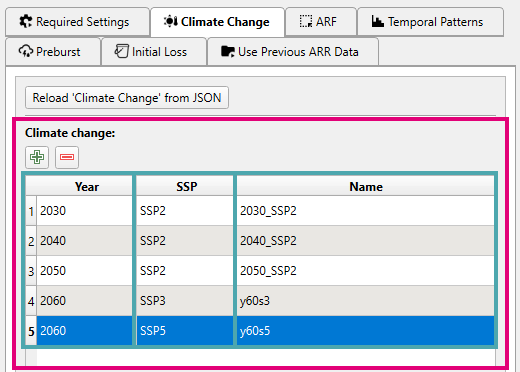
Climate change scenarios can be added or removed from the table using the corresponding buttons: /
Each row in the Climate change table represents a climate change scenario. For each row, the user can select a Year (projection year) and SSP (Shared Socioeconomic Pathway) from the comboboxes, and specify a scenario Name.
The Name column is populated with <Year>_<SSP> by default (e.g. 2070_SSP2), but can be edited by the user as required. This scenario name will correspond to the event/scenario name in the TUFLOW outputs.
2.2 Initial Loss
Note on complete storm events
If the event is using a complete storm event (preburst + burst), the climate change initial loss is always calculated using the storm initial loss and the climate change factor regardless of the selected option below.
There are two options on how to factor the climate change initial loss values:
-
Scale storm IL (default): The storm method scales the storm initial loss and subtracts the climate change adjusted preburst depth to calculate the burst initial loss.
\[ IL_{CC\_burst} = IL_{storm} \times IL_{CC\_factor} - PB_{ratio} \times RF_{CC} \] -
Scale burst IL: The burst method scales the calculated burst initial loss.
\[ IL_{CC\_burst} = IL_{burst} \times IL_{CC\_factor} \]
2.3 Outputs
By adding climate change scenarios, the following outputs will be turned on:
- An additional boundary database file:
bc_dbase_CC.csv -
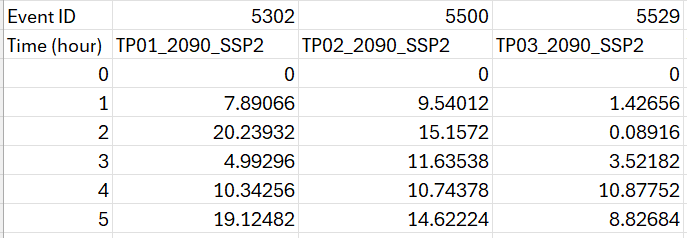
Climate change rainfall boundaries will be added to each event in the
rf_inflow/*.csvoutputs.Climate change TP column names
Column names within the rainfall boundary files will be suffixed with the unique climate change scenario name.
-
An additional climate change section will be added to the event file output (
.tef). Each climate change scenario will be listed here using the scenario name.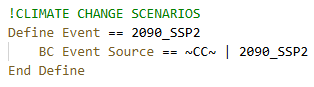
2.4 Working Data
Adjusted IFD curves and initial loss values for each climate change scenario are output to the working_data folder.