11. PyTUFLOW Integration
Under the hood, the ARR to TUFLOW tool uses PyTUFLOW to fetch and process data from the ARR Data Hub. It's possible to take the configuration file(s) saved by the ARR to TUFLOW tool and run them directly in PyTUFLOW.
In many ways, doing repeat runs is quicker to do in PyTUFLOW as it does not require opening QGIS, opening the tool, and configuring the options in the dock window. With PyTUFLOW, the configuration file(s) can be run using a single Command Line Interface (CLI) command.
pytuflow-arr config.json [config2.json ...]
See the PyTUFLOW documentation for more information:
docs.tuflow.com/pytuflow/1.3/cli/pytuflow-arr.
The inverse is also true, it is possible to take a configuration file that was previously run through PyTUFLOW, and load the configuration into the ARR to TUFLOW tool. The configuration can be viewed, edited, and saved within the ARR to TUFLOW docking window - see Saving Configurations.
11.1 PyTUFLOW Version
The PyTUFLOW version used to generate the outputs are written into the rf_inflow/*.csv file header:
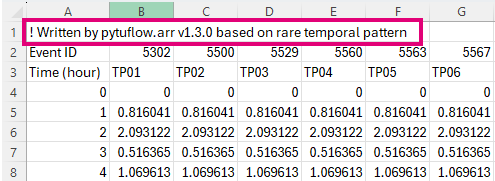
It is recommended to keep this information (or record it elsewhere) so that the same outputs can be regenerated in future, if needed.
Running on a specific version of PyTUFLOW is easily done in Python by installing the required version:
python -m pip install pytuflow==1.3.0
Running the correct version of the plugin is also quite easy, however requires matching up plugin versions with PyTUFLOW versions. This can be done by looking in the Changelog. Each time the PyTUFLOW version is changed, this will be noted in the changelog:
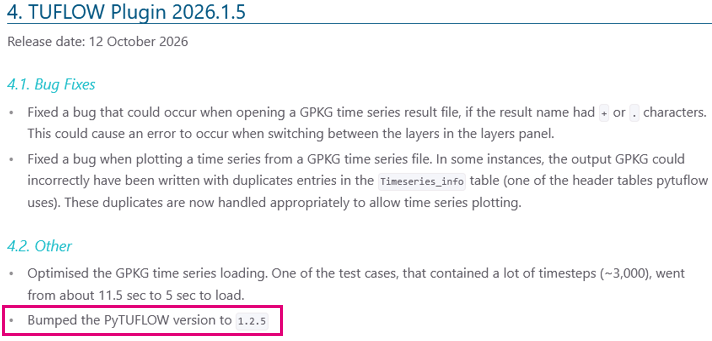
If the PyTUFLOW version is not noted, this means that the version was not changed from the previous version of the plugin.
Previous versions of the TUFLOW plugin can be downloaded from the following page:
plugins.qgis.org/plugins/tuflow
Note, that old versions of the TUFLOW plugin may not be forward compatible with newer versions of QGIS.