Changelog for TUFLOW FV 2026.2.0
Release date: 28 Aug 2026
Build: 2026.2.0
General Notes
The 2026.2.0 version of TUFLOW FV includes a range of enhancements focused on user experience, diagnostics and data management. The following key improvements are included.
- A new Error and Warning Messages system with integrated GIS output and spatial location information.
- Migration of the TUFLOW FV User Manual to the Quarto publishing platform for enhanced navigation and searchability.
- Expanded control over restart file output with user specified write times.
- A new TUFLOW FV Toolbox Create Project tool in QGIS.
Guidance on NetCDF and XMDF HDF5 File Locking is also provided.
Licensing
For perpetual licences, to run simulations using 2026.2.0 requires payment of the 2026/2027 annual software maintenance fee (invoiced mid-2026) and for the TUFLOW licence to have been updated with the 2026/2027 annual maintenance licence patch (i.e., via RaC/RaU files). For active rental and subscription licences, no updates should be required.
For any licensing enquiries please contact sales@tuflow.com, or for general support support@tuflow.com.
Changes to Versioning
Starting with 2026.2.0, bug fix releases will increment the minor version number (i.e. the middle digit, in this case 2) rather than the patch version number (the last digit). This change allows users to retain all previous versions (with one exception, noted below) of TUFLOW FV when installing TUFLOW FV via an installer, such as the .msi installer on Windows.
Installers currently overwrite patch versions within the same minor stream (for example, installing 2026.0.1 replaces 2026.0.0). By moving bug fix releases to the minor version, users will have greater control and flexibility on which TUFLOW FV versions they wish to have on their computer.
Patch releases will still be used for security issues and critical bug fixes, but these are expected to be rare. Patch releases will increment the patch version number and the installer will continue to replace the previous version within the same minor stream.
The previous bug fix release, 2026.0.1, has been re-released as 2026.1.0 so users can retain 2026.0.0 when installing via an installer (hence this release is 2026.2.0).
Accompanying TUFLOW FV User Manual updates will still only be published for scheduled minor and major releases that contain feature updates. No user manual updates will be made for bug fix releases.
Changes to Installation
From TUFLOW FV 2026.2.0 onwards, packages will no longer contain MS VC 14.0 runtime libraries. Previous versions of TUFLOW FV did package these libraries. Users of TUFLOW FV on Windows may be required to install the official Microsoft runtime if it wasn’t installed on their systems previously. In case the installer package does not succeed in installing it, or if you are a user of the portable .zip version, you can obtain a version here: Latest Supported Visual C++ Redistributable Downloads.
Backwards Compatibility
It is not expected that the 2026.2.0 release will cause changes in results if upgrading from any of the prior 2026.x releases.
New Features and Enhancements
Error and Warning Messages
TUFLOW FV errors and warnings now include a unique numeric message ID. The ID appears in the run log alongside the message text and each message is followed by a direct link to the TUFLOW FV Messages online registry. An example log file warning and error message is provided as follows.
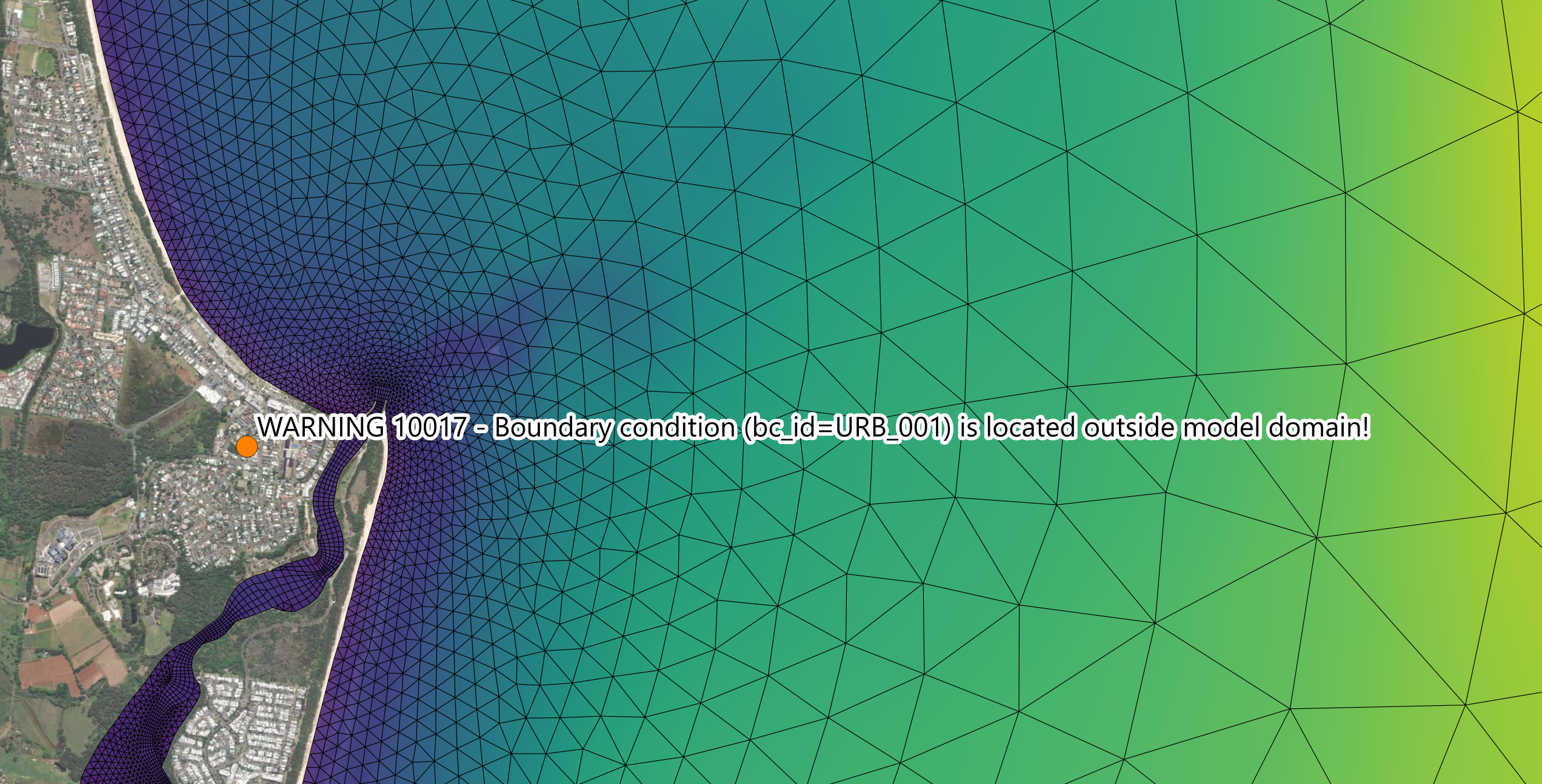
XY: WARNING 10017 - Boundary condition (bc_id=URB_001) is located outside model domain!
More info: https://docs.tuflow.com/messages/10017?product=fv&version=2026.2.0&language=en-au&severity=warningNOXY: ERROR 10200 - Could not create directory: C:\Models\MyModel\
More info: https://docs.tuflow.com/messages/10200?product=fv&version=2026.2.0&language=en-au&severity=error
The messages registry provides a description of each message and suggestions for resolving it.
Messages prefixed with XY: have an associated model location. For these messages TUFLOW FV also writes a GIS point layer to the log/ folder named <run_name>_messages_P.shp. Each point in the file records the message and the url as attributes. Messages prefixed with NOXY: have no associated spatial location and appear in the log and console window only.
For XY: messages the GIS point will be at one of two locations. Where the issue relates directly to a model feature (such as a GIS input geometry or boundary condition) the point is placed at that feature’s location. An example of this is shown in the image below for WARNING 10017. Where the issue has no specific feature location the point is placed at the upper right (north east) corner of the mesh bounding box. In both cases the message ID and text in the attribute table identify the issue.
The GIS message layer is written by default and can be disabled using the following command.
Message IDs are grouped into series by module:
| Series | Engine/Module |
|---|---|
| 3000 | TUFLOW FV GPU Engine |
| 10000 | TUFLOW FV 2D, 3D Engines and AD Module |
| 11000 | TUFLOW FV Sediment Transport Module |
| 12000 | TUFLOW FV Water Quality Module |
| 13000 | TUFLOW FV Particle Tracking Module |
Notes:
- The 11000, 12000 and 13000 series do not yet include location specific GIS messages.
- Only a sub-set of hydraulic structure messages in the 10000 series include location specific GIS messages. Most are output at the upper right corner of the mesh boundary box.
- Water Quality module messages (12000 series) do not yet include messages output to the water quality log file.
The messages registry will continue to expand and improve over time. If users would like more information on specific errors or warnings, please contact support@tuflow.com and the team will prioritise those pages when making updates.
TUFLOW FV User Manual Update
The TUFLOW FV User Manual has been migrated to a new publishing system based on the Quarto framework. This improves navigation, search functionality and provides consistency with the 2026 upgrade of the TUFLOW Classic/HPC User Manual, TUFLOW CATCH User Manual and TUFLOW FV Water Quality User Manual.
The structure of the TUFLOW FV User Manual remains unchanged from the 2026.0.0 release.
Write Restart File at Specific Time
A new command was added to write a restart file at a specific user requested time rather than at a periodic interval. The time can be specified in HOURS or ISODATE format. This is available for restart files written from the TUFLOW FV control file (.fvc), the sediment transport control file (.fvsed) and the particle tracking control file (.fvptm).
Further details are provided in the TUFLOW FV User Manual. This command can be specified in the sediment transport control file (.fvsed) or particle tracking control file (.fvptm) in a similar manner to create user defined bed restart files (_bed_UR.rst) and particle restart files (_ptm_UR.rst).
HDF5 File Locking
- HDF5 is a data library that underpins the handling of NetCDF and XMDF files
- TUFLOW FV
2026.0.0-2026.2.0includes HDF5 version 1.14.6 (TUFLOW FV2025.2.2used version 1.8.16) - File locking is enabled by default since version 1.10.0 of HDF5. File locking is designed to prevent simultaneous file access that could cause inconsistent reads or file corruption.
- Although file safety is achieved, locking prevents other processes from reading the file, in ways that differ by platform. This has the following workflow drawbacks when running TUFLOW FV.
- NetCDF or XMDF TUFLOW FV result files cannot be copied on Windows while a simulation is running.
- As a result, the TUFLOW Viewer QGIS Plugin’s Copy hdf5 Files Before Loading functionality will not run successfully on Windows.
- NetCDF or XMDF TUFLOW FV result files cannot be opened for review in programs such as QGIS, MATLAB or Python while a simulation is running.
It is possible to override the now default HDF5 file locking behaviour in TUFLOW FV and other applications using the same HDF5 library by setting the environment variable HDF5_USE_FILE_LOCKING to FALSE in each application’s environment. However, disabling file locks is ‘opt-in’, a decision made at the user’s own risk.
The main risks of turning off file locking:
- Reading from the file can silently return incoherent data, even when only one run is writing, because metadata and raw data are not flushed in a coherent order.
- If more than one writer process modifies an HDF5 file at the same time, the file can be corrupted.
- If a process opens the HDF5 file, even for reading, it may place a lock by default; on Windows this can cause the TUFLOW FV simulation writing to that file to exit prematurely.
Read more about best practices that may avoid issues with disabled file locking on the HDF5 File Locking TUFLOW FV wiki page.
TUFLOW FV Toolbox Create Project
A new TUFLOW FV Toolbox Create Project tool is available in QGIS. For further details, see the QGIS TUFLOW Plugin Changelog.