This is an interim changelog that accompanies the TUFLOW 2026.0.0 beta release. The information contained within this interim version may vary from the final version.
Changelog for TUFLOW 2026.0.0
Release date: 13 Feb 2026
Build: 2026.0.0-beta.1
- General Notes
- Backwards Compatibility
- New Features and Enhancements
- Linux Release
- GeoPackage Time-Series Output Format
- Groundwater Moisture Outputs Use Consistent Naming
- Groundwater Vertical Flux Outputs
- HEC-DSS Now Supports Paired Curves
- Improved Approach for TUFLOW-SWMM Automatic Inlets
- New TUFLOW-SWMM Nodal Datasets
- Modelling Surcharge with Q Pit and Negative y-Q Curve
- Enhancement of Form Loss Calculation with Rotated Mesh
- HPC Infiltration Drying Approach == Method C
- Set Cell Drying Depth
- Downgrades HPC Non-Newtonian Mixing Exponent Error
- Write XMDF Files Using HDF5 Library
- Opt-In Option to Use GDAL Library to Read and Write Some Raster (Grid) Formats
- Bug Fixes
General Notes
The 2026 TUFLOW release is a major release and includes a number of big features and changes. The most notable change is the addition of the highly anticipated Linux Release. This has been a major development effort that has required updates to the code, code structure, and compilation process. This has been a key focus of the development team for the last 12 months (and has been underway in some capacity for much longer). The Linux build supports all TUFLOW Classic and HPC features and should produce equivalent results to the Windows build.
Other key features include a new self-contained GeoPackage time-series format, the ability to specify a different surcharging discharge relationship for ESTRY “Q” type pits, the use of GDAL drivers, and many more items.
Because this is a major release, there are a number of default changes and other changes that may cause differences in results. See the Backwards Compatibility section below for more information.
Backwards Compatibility
The 2026.0.0 release may cause changes in results if upgrading from previous releases. This is due to a number of default changes being made as part of this major release. In addition, there has been a compiler update, updates to the code, and updates to the compilation process to accommodate the new Linux build. Due to the compiler update, even when switching defaults back to previous settings with
It is recommended that when switching to this release with an established model, that test runs are carried out and comparisons made between the old and new releases to ensure that any changes are understood.
New Features and Enhancements
Linux Release
A Linux build is now available for TUFLOW Classic and HPC, and both .deb and .rpm packages are available. The Linux build has been tested on Ubuntu 22.04 and Rocky 9.
All features of TUFLOW Classic and HPC are supported in the Linux build, producing results equivalent to the Windows version.
To install the beta version, download the appropriate package for the Linux distribution from the TUFLOW Downloads page and install the package using the appropriate package manager for the distribution. For example, on Ubuntu, the TUFLOW 2026 beta can be installed using the following command in the terminal (making sure to use the correct path to the downloaded .deb file):
sudo apt install ./tuflow_2026.0.0~beta.1-1_amd64.deb
It is also a temporary requirement for the beta release to set the stack size limit to unlimited when running TUFLOW on Linux. This can be done with the following command in the terminal:
ulimit -s unlimited
Linux file systems are typically case-sensitive, while Windows file systems are generally case-insensitive. This may cause problems when copying models built on Windows. A new command line argument has been added to allow TUFLOW on Linux to be less sensitive to the case in referenced file paths. This can be enabled with the following command -cs[level] where the level can be set to:
0- Strict (default)1- Case-insensitive - this applies only to the part of the file path referenced in the control files (i.e. typically this is a relative path).
For example, the following command runs the TUFLOW example model EG00_001.tcf with case-insensitivity enabled:
/opt/tuflow/bin/tuflow_2026.0/tuflow-isp -cs1 ./runs/EG00_001.tcf
Note, on Linux TUFLOW will automatically interpret backslashes as forward slashes when processing file paths referenced in the control files.
GeoPackage Time-Series Output Format
The 2026.0.0 release introduces a new GeoPackage based time-series output format, similar to the GPKG time-series output by TUFLOW when linked to the EPA-SWMM engine.
The time-series GeoPackage format can be activated by specifying “GPKG” in the time-series output format command in the TCF:
This format has multiple advantages over the default csv based files:
- All the data is in a single file making it easier to move around without losing part of the information.
- The GIS objects can be symbolised based on the values in the current timestep. This means the styling can be setup to vary temporally, allowing for more effective visualisation of the results.
- The files can be loaded into the TUFLOW Viewer inside of QGIS or ArcGIS Pro. ArcGIS Pro does not require an add-on and time-series results can be plotted with the native ArcGIS Pro tools.
- Quicker to load large files into the TUFLOW Viewer.
The GPKG time-series files can be loaded and queried with PyTUFLOW with the TPC, GPKG1D, GPKG2D, or GPKGRL classes.
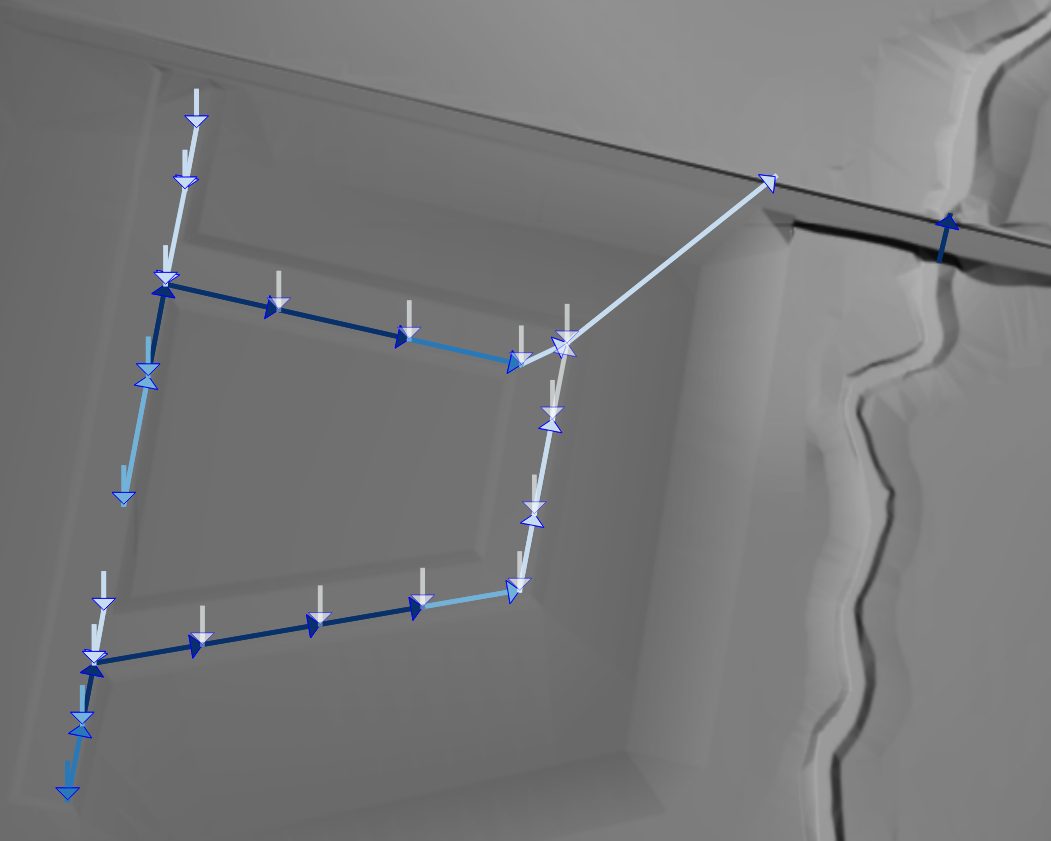
The image below shows time-series results for one of the TUFLOW example models where the pipes are coloured based on the discharge. The objects (points, lines, or polygons) can be symbolised with any of the tools in the chosen GIS including size, colour, and symbol.
Groundwater Moisture Outputs Use Consistent Naming
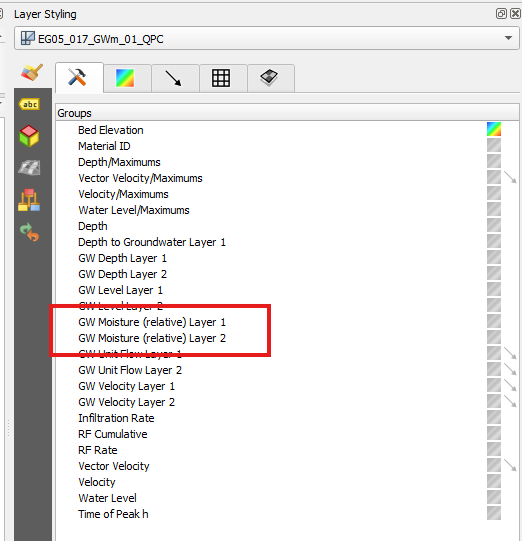
The groundwater moisture outputs have been renamed in the output files to "GW Moisture (relative)". The details are as follows:
- Map output data type - the
"GWm"map output result type has been renamed in the output from"GW Moisture"to"GW Moisture (relative)". - PO point data type - the
"GWm"po result type has been renamed in the output from"GW capacity fraction"to"GW Moisture (relative)".
Groundwater Vertical Flux Outputs
Two new map output datasets have been added that represent the flux (flow of water) and cumulative flux between vertical groundwater layers. For groundwater layer #1, this represents the infiltration volume. For other layers, it is the flow entering the layer from the layer above.
These output datasets are superior to the CI (Cumulative Infiltration) dataset because it is not limited to single layer models without groundwater movement. The new map output data types are:
GW_QZ: Groundwater Volume FluxGW_QZI: Groundwater Volume Flux Cumulative
More information can be found in the TUFLOW User Manual.
HEC-DSS Now Supports Paired Curves
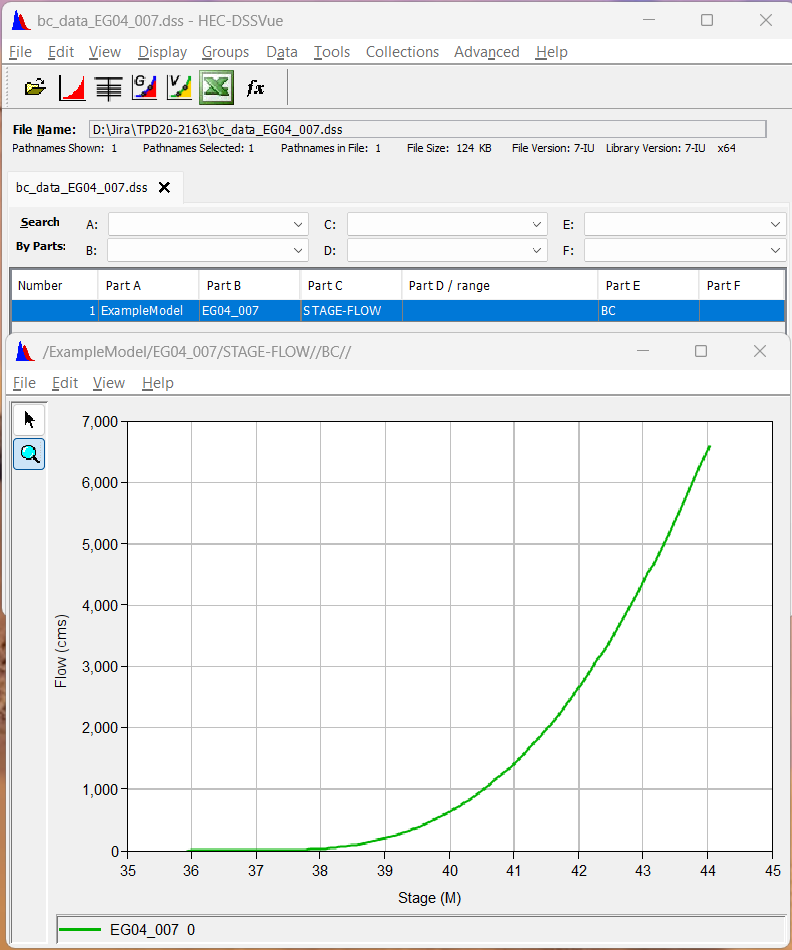
TUFLOW now supports reading non-time-series curves stored as “paired data” from HEC-DSS files for rating curves or other non-timed data. Paired curves are accessed the same as time-series curves as described in the TUFLOW User Manual.
Improved Approach for TUFLOW-SWMM Automatic Inlets
An improved approach has been added for how TUFLOW-SWMM handles inlets that have been assigned as “AUTOMATIC”. The previous approach, prior to 2026.0.0, estimated the direction of flow entering the inlet. If 85% of the flow was from a single direction, on-grade was used, otherwise on-sag was used. The new approach simply computes both the on-sag and on-grade discharges and applies the larger one. The previous method was considered experimental and backward compatibility has not been provided.
Accompanying the new approach, a new TUFLOW-SWMM GPKG time-series output data type has been added: “Inlet OnGrade Duration Percent” that reports the cumulative percentage that an inlet applies the on-grade discharge and is only written if automatic inlets exist. On-grade inlets should be reviewed to make sure that the street cross-section, local depressions, and longitudinal slopes are correct as these impact on-grade inlets, while on-sag inlets are driven by water levels rather than these design features. It is also important that on-grade inlet connected cells span the full approach flow path width. This can be confirmed by reviewing simulation outputs with the 1d_to_2d check file.
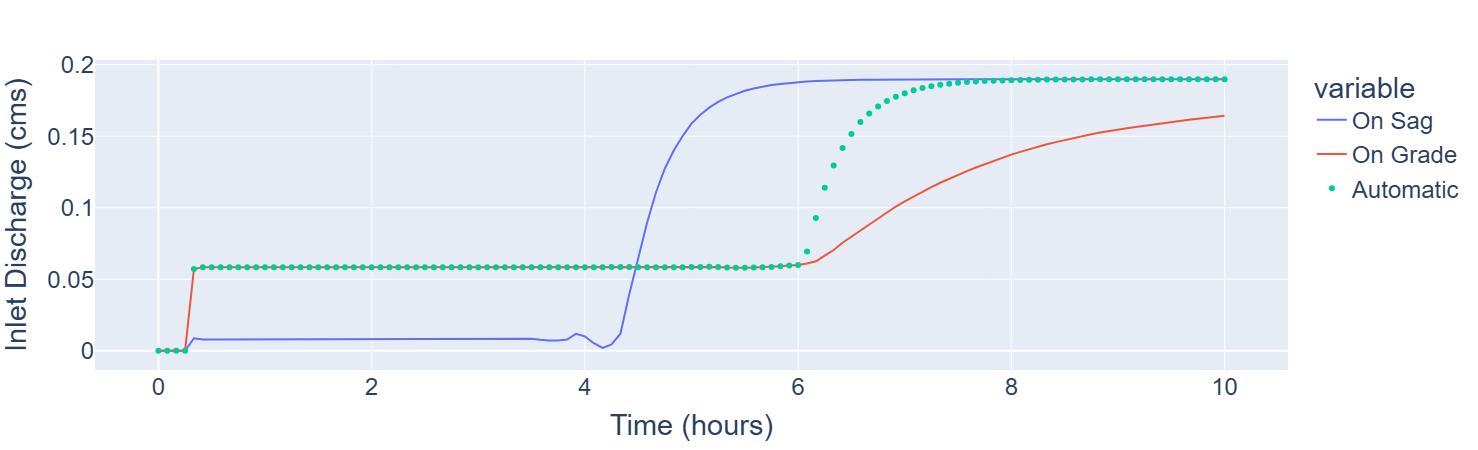
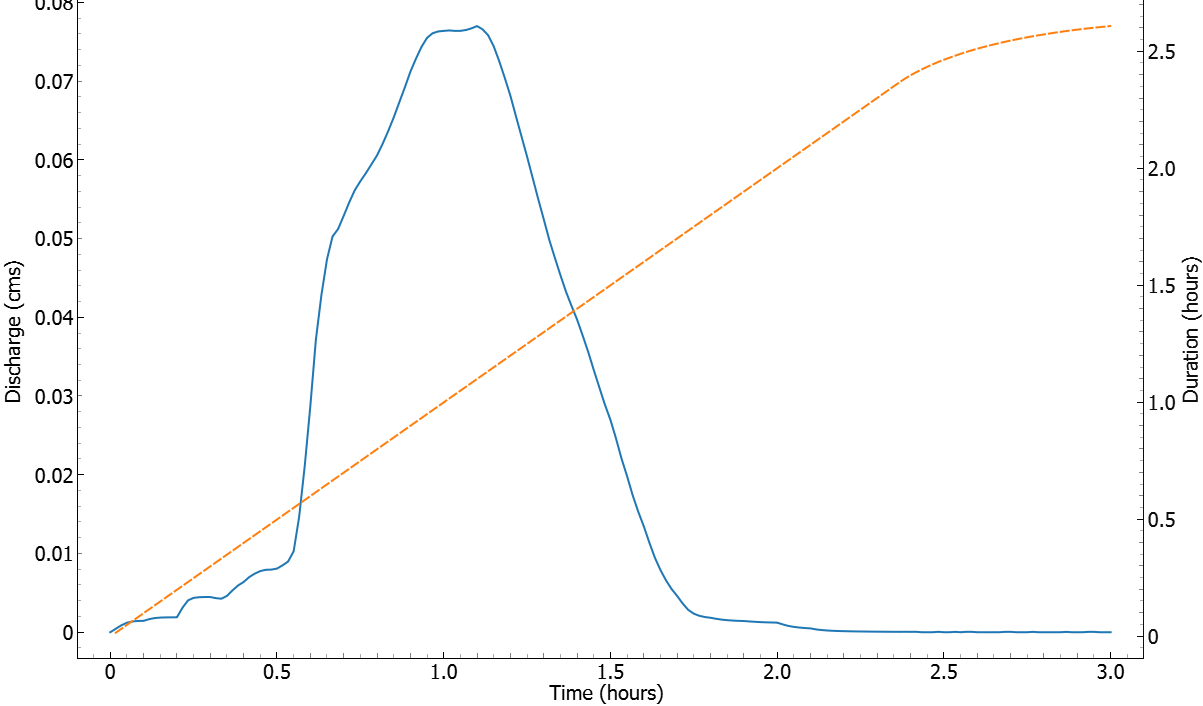
The figure below shows the result from a simple test model with a single pit on a steep road with a downstream blockage. As the flood progresses, the blockage downstream causes water to back up and eventually water starts to pond at the inlet. The same model was run three times, modelling the pit as an on-sag, on-grade, and automatic inlet type.
- Early in the simulation, the flow is shallow and fast moving and the automatic inlet uses on-grade calculations. This can be seen as the on-grade and automatic curves align at the start.
- At about 6 hours, the automatic inlet switches to on-sag due to the increased depth of water at the inlet.
- The on-sag curve seemingly becomes dominant at about 4 hours. The delay in the automatic case switching to on-sag is due to the increase in flow capture early on, meaning the on-sag approach doesn’t become dominant until later in the automatic simulation.
New TUFLOW-SWMM Nodal Datasets
TUFLOW-SWMM models now include additional nodal output data types in the GPKG time-series output file:
-
Inlet Inflow Duration - The duration (hours) that there is positive flow from the 2D domain into the node through an inlet. Non-inlet nodes are not represented.
-
Inlet Surcharge Duration - The duration (hours) that there is surcharging (negative flow reported in Flow from 2D) from the node into the 2D domain for nodes connected to inlets. Non-inlet nodes are not represented.
-
Inlet OnGrade Duration Percent (only written if inlets with “Automatic” approach exist) - The cumulative percentage that an inlet functions as on-grade compared to on-sag.
Modelling Surcharge with Q Pit and Negative y-Q Curve
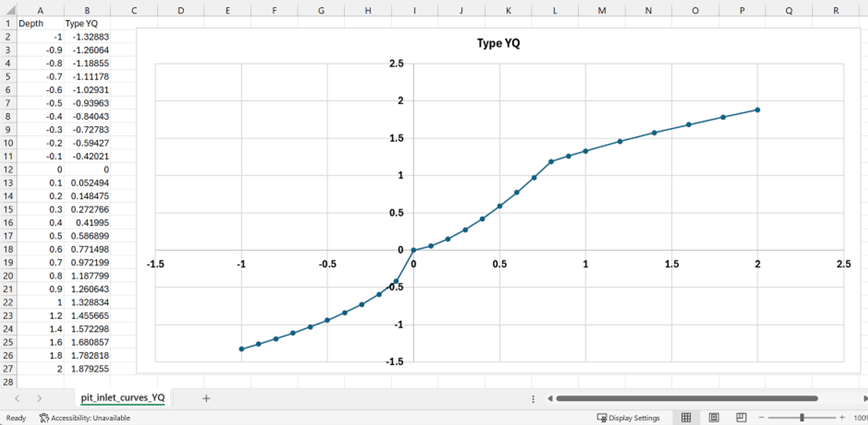
ESTRY “Q” type pits now support different depth vs discharge relationships for draining conditions and surcharging conditions. To do this, users should define a negative portion within the existing discharge curve. See image below for an example.
The logic for using the discharge curve is as follows:
- When the water level in the 1D pit node exceeds the water level in the 2D, the difference between the levels is now used to search the negative portion of the depth vs discharge curve.
- When the water level in the 1D pit node is lower than the pit intake level or the 2D water level, the positive portion of the depth vs discharge curve is used.
Defining negative head difference vs negative discharge relationship is optional. If a negative portion does not exist in the curve, the surcharge is processed as per the previous TUFLOW releases prior to the 2026.0.0 release i.e. the positive portion of the depth-discharge curve is used for both draining and surcharging conditions.
Enhancement of Form Loss Calculation with Rotated Mesh
Internal testing has identified that the head loss due to the form loss defined by 2d_lfcsh and 2d_bg layers can become underestimated when the hydraulic structure is rotated against the 2D mesh. The 2026.0.0 release implements an enhancement to solve the issue using the following command:
Note, this new option is now the default in the 2026.0.0 release. To revert to the previous method, the above command should be set to “OFF”.
HPC Infiltration Drying Approach == Method C
The 2026.0.0 release has made a minor enhancement to the HPC infiltration drying approach and incremented the new method name to “Method C”. This new method has been set as the new default in the 2026.0.0 release:
The drying depth in the new approach has been set to 0.0001 m below the wetting depth, but this can also be set by the user. See Set Cell Drying Depth below for more details.
Set Cell Drying Depth
The existing “Cell Wet/Dry Depth” command has been modified to accept a second argument to define the drying depth. For example:
The above command sets the wetting depth to 0.002 m, and sets the drying depth to 0.001 m. Note, the default drying depth will be set to 0.0001 m below the wetting depth if a second argument is not provided. Using a smaller drying depth can trap marginal volume of water on 2D cells, but it could also improve the stability of direct rainfall models with/without SGS.
Downgrades HPC Non-Newtonian Mixing Exponent Error
ERROR 2565 has been downgraded to a WARNING if the 10. Note, ERROR 2565 is still triggered if the exponent is less than 0 (zero).
Write XMDF Files Using HDF5 Library
TUFLOW now writes XMDF outputs by utilising the HDF5 library directly rather than through the intermediary XMDF library. This change allows the use of the most up-to-date HDF5 library. The generated files should be equivalent.
Opt-In Option to Use GDAL Library to Read and Write Some Raster (Grid) Formats
Beta Functionality
TUFLOW now has the option to read and write some raster files using the GDAL Library. A primary driver for this functionality is that it supports raster formats such as tiled GeoTIFF files that previously could not be read. For more information, refer to the TUFLOW User Manual.
This functionality is enabled using the following command:
For outputs, currently only the TIF and GPKG map output formats are supported with the GDAL drivers.
GDAL supports format specific configuration options that control settings such as compression, tiling and storage behaviour. These options apply only when rasters are written using GDAL (
GDAL Raster Create Options == <raster_format> | <creation_options>
The <raster_format> is the name of the GDAL driver that is used to write the raster, and not the name of the output in TUFLOW. For example, GTiff should be used as this is the GDAL driver name for GeoTIFFs and not TIF. This does not affect the Map Output Format command, which should still use TIF.
The example below sets several creation options for TIF outputs: it sets the compression method to use ZSTD and sets the format to use tiling rather than strips. More details on these options can be found on the GeoTIFF GDAL driver page.
In addition, GDAL support expands the available options for defining the model projection via the existing “TIF Projection” command. When GDAL is enabled (OGRSpatialReference::SetFromUserInput() function (e.g. EPSG codes). Refer to the GDAL Documentation for a list of all available options.
As an example, the following command can be used to set the TIF projection for the TUFLOW tutorial model:
As this is beta functionality, some changes may occur in future versions.
Bug Fixes
1D Network Domains - EPA SWMM
- Fixed a bug where a SWMM inlet assigned an elevation
-99999was not assigned an elevation interpolated from the grid as expected. This resulted in an invalid inlet elevation triggering ERROR 6024.
1D Network Domains - ESTRY
- Fixed a bug where rows in a 1d cross-section csv file were skipped if there were leading spaces before a negative value.
Domain Construction
- Fixed a bug where input grid files are skipped and not closed properly. This could cause ERROR 0640 due to opening too many grid files at the same time. TUFLOW now closes skipped grid files at the end of each read grid command.
Boundaries and Links
- Fixed a bug where 1D flux was not correctly applied to SX cells connected to the groundwater layer in Quadtree models.
Outputs and Check Files
- Fixed a bug that could incorrectly cause WARNING 2476 to trigger if a PO point with a groundwater type (e.g.
GWqu,GWqaetc.) was used. - Fixed a bug that could cause TUFLOW to write out a “Wind” output instead of a groundwater flow angle output for PO outputs if the user specified
GWqaon a PO point. - Fixed the
PO_check_LforGWQline types in Quadtree. Prior to this fix, the geometry of the line check was not being written correctly and could be located in the incorrect location. - Fixed a bug where the
plot/gis/PLOT.csvfile from Quadtree simulations hardcoded the geometry type as “R” (region type). This file now writes the correct geometry type (e.g. for PO points it will write “P”). This affects PyTUFLOWv1.0.x, as theTPCclass uses the geometry types written to this file. This has been fixed in PyTUFLOWv1.1. - Fixed a bug that could cause a crash during pre-processing if SX cells were connected to a groundwater layer in a Quadtree model.